CAPilot AI — Today's brief
The first thing a Partner sees when they open CAPilot in the morning. One headline, a few category-tagged bullets, and click-through actions to the work that matters today.
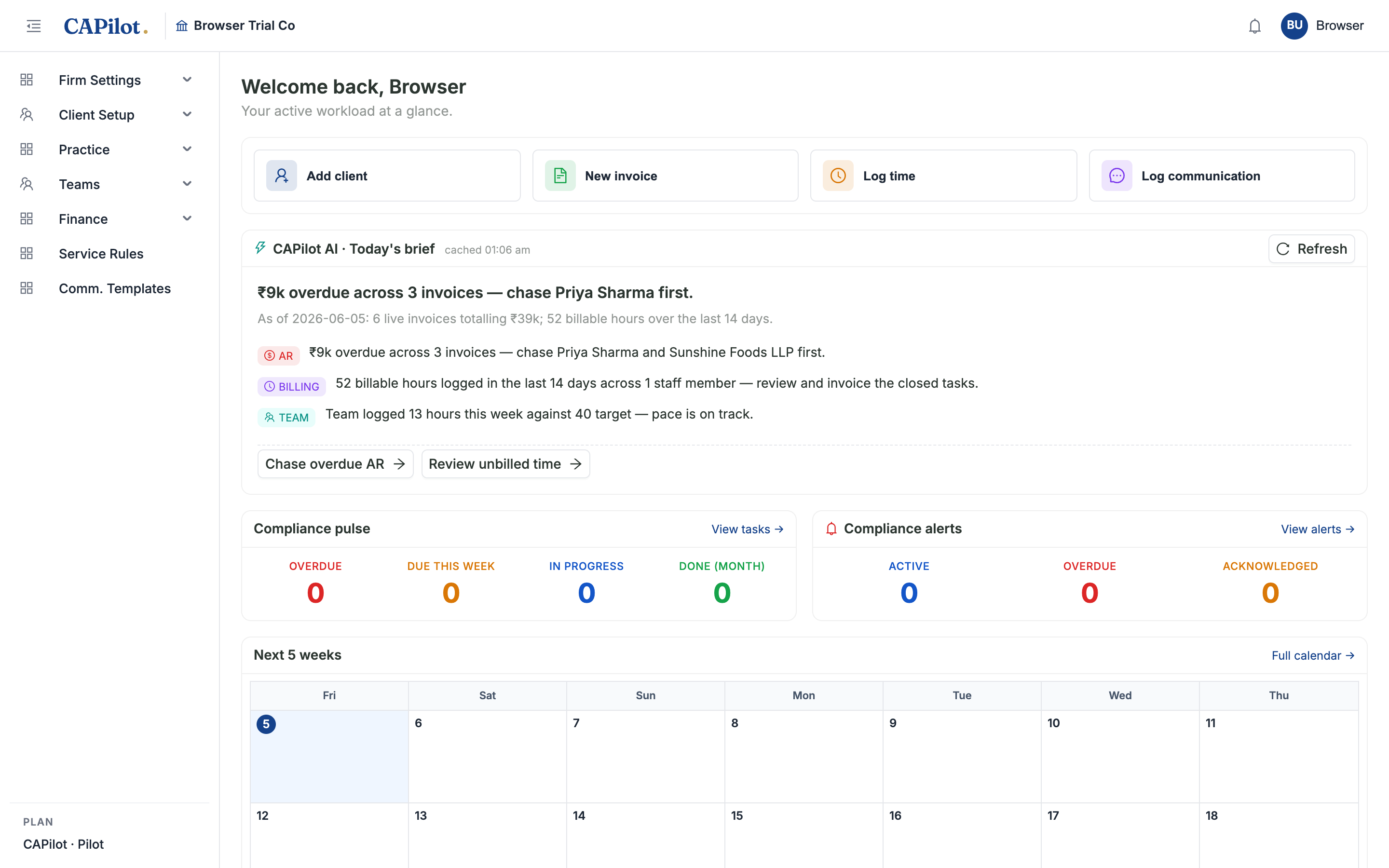
What you see in the screenshot
This is the actual dashboard of a CAPilot trial firm, on 5 June 2026, with no narrative written by hand:
₹9k overdue across 3 invoices — chase Priya Sharma first.
As of 2026-06-05: 6 live invoices totalling ₹39k; 52 billable hours over the last 14 days.
- AR — ₹9k overdue across 3 invoices — chase Priya Sharma and Sunshine Foods LLP first.
- BILLING — 52 billable hours logged in the last 14 days across 1 staff member — review and invoice the closed tasks.
- TEAM — Team logged 13 hours this week against 40 target — pace is on track.
[Chase overdue AR →] [Review unbilled time →]
The numbers, client names, action buttons — all generated by reading the firm's own data, no manual setup, no LLM prompt to craft.
How it works
When the dashboard loads, CAPilot runs five firm-scoped queries in parallel:
| Category | Source | Surfaces |
|---|---|---|
| AR | Invoice rows in Sent / Overdue / PartiallyPaid status | Total outstanding, count overdue, top three to chase |
| Billing | TimeEntry rows from the last 14 days, billable, on tasks not yet Done/Filed | Hours waiting to become invoices |
| Compliance | ComplianceTask rows with DueDate in the next 14 days | Overdue, due-this-week, due-next-week buckets |
| KYC | Client rows missing PAN, or missing GSTIN when the client type requires it | Houses-keeping gaps blocking GST filings |
| Team | TimeEntry rows for the current ISO week, by staff member | Anyone under 30% utilisation flagged |
A small rule-based composer takes those five chunks of data and:
- Picks the single highest-pressure signal for the headline (overdue AR > overdue compliance > unbilled hours > KYC gaps).
- Drops in 3–5 category bullets with concrete numbers.
- Suggests 2–3 click-through actions to the relevant grid (Invoices, Compliance Tasks, Time Entries, Clients).
Result is cached once per firm per day. A Refresh button on the card re-reads the firm state and regenerates against the latest numbers (the counter is just a soft rate-limit, in case the page is reloaded a lot).
Local-first, by design
CAPilot AI runs entirely on your firm's database — no data leaves the server, no tokens are spent on an external API, the digest is deterministic and reproducible. We chose this for three reasons:
- Privacy — client AR, staff utilisation, KYC status are sensitive. A pure-local digest never crosses a network boundary.
- Cost — zero per-firm cost lets us include this in the base ₹599/staff/month plan rather than an "AI tier".
- Validation — the prioritisation logic ("chase AR first, then file compliance, then bill hours") is a finite ladder a CA can argue with and tune. An LLM's narrative can drift, a deterministic ladder can't.
A Claude API integration sits behind the same endpoint contract for firms who want more natural, varied narrative — a one-line config swap. We'll switch it on once a CA tells us the rule-based version isn't expressive enough.
Who sees it
The brief is Partner-tier and SuperAdmin only — the AR + utilisation signals it surfaces are firm-wide and partner-relevant. Managers, Seniors, Associates, and Articles see the rest of the dashboard but not this card. The server enforces the role gate; the frontend just hides the widget to avoid a noisy 403 on dashboard load.
What's not built yet
- Slack / WhatsApp delivery — same digest as a 7am push instead of needing to open CAPilot. Easy follow-up slice.
- Email weekly summary — once-a-week roll-up to the partner's inbox with the week's pressure points.
- Comparison vs last week — "₹9k overdue this morning, up from ₹3k on Monday." Needs a daily-snapshot table.
- Per-staff briefings — Manager sees their reports' utilisation, Senior sees their assigned tasks. Today only the partner gets a digest.